
Wallet Loyalty, Rewards and Push Notifications for Growing Brands
Wallet loyalty passes your audience adds in one tap, with no app to download.
PushPass puts your loyalty pass in your audience’s Apple Wallet or Google Wallet and sends your messages straight to their lock screen. The result is an audience you can reach whenever you choose, and people who saw your ad once become customers who keep coming back.
14-day money-back guarantee. No contracts. Cancel any time.
See a live pass and talk through your plans. For businesses and creators planning a wallet pass.
 Or point your phone camera here to add our pass to your wallet.
Built for growing brands, influencers and the agencies behind them. Trusted by over 1,000 brands.
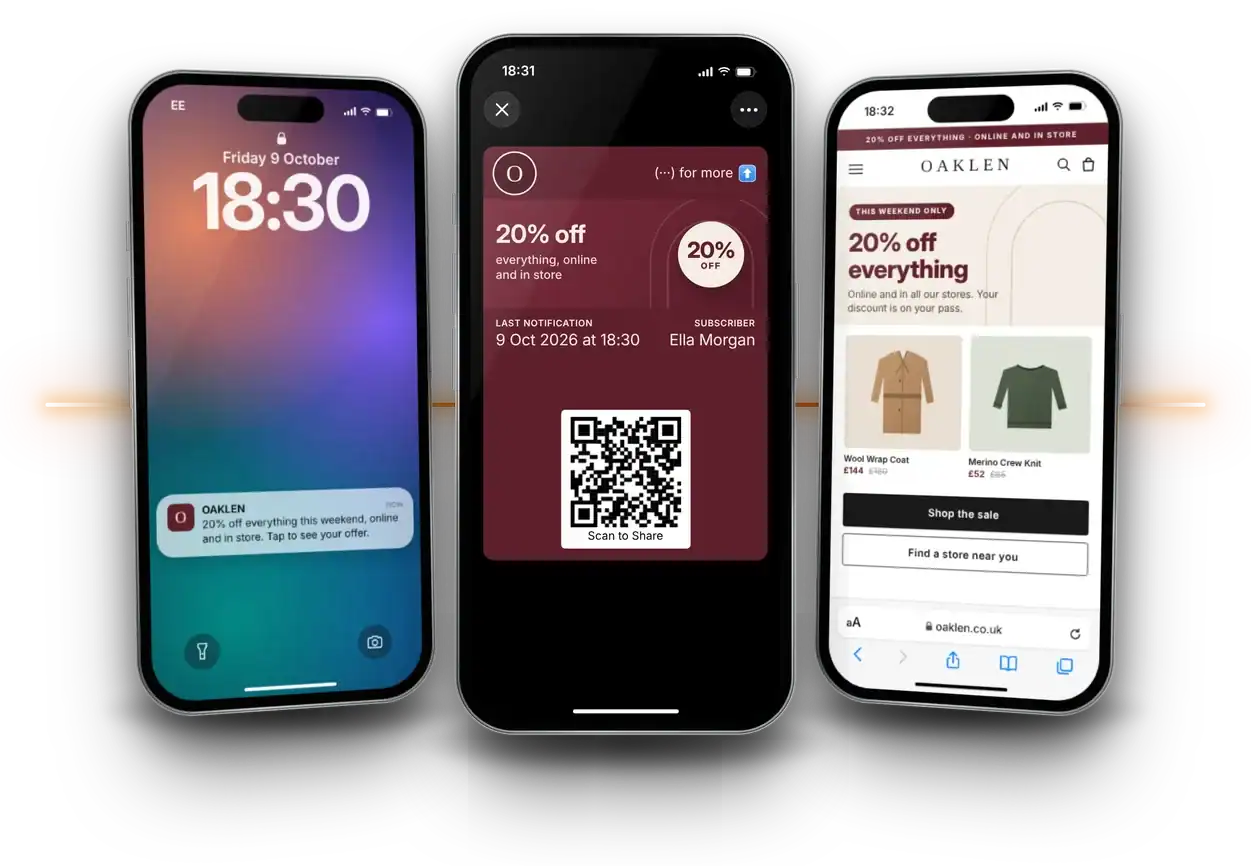
On the lock screen
In their wallet
On your site
Most of your audience hasn't bought from you yet
Most loyalty schemes start after the first sale, at the till or the checkout. Everyone who saw your ad, watched your video or walked past your sign and didn’t buy that day is gone. With PushPass they can add your pass before they’ve spent anything, and you can reach them until they’re ready. That’s the simple reason wallet pass marketing works.
Sees your brand in ads or video
Adds your pass
Gets your messages
Makes a first purchase
Comes back again
How PushPass works
Three taps between your advert and your customer, and none of them is a download.
Add the pass
One tap from a link or QR code puts your branded pass in Apple Wallet or Google Wallet. No app store, no account to create.
Get the notification
Your branded messages appear as notifications on their lock screen, the screen they check more than any other on the phone.
Tap through to you
The pass opens with their rewards and links them to your offer, store, social channel, anywhere.
Loyalty without asking anyone to download an app
A loyalty app asks your customer to
- Find it in an app store
- Download it and give up the space
- Create an account and a password
- Allow notifications
- Remember to open it
PushPass asks them to
Your pass sits in the same wallet as their payment cards and loyalty cards. Their rewards are always one swipe away, and your messages reach the lock screen without them opening anything.
What you can do with PushPass
Reach people before they buy
Capture your audience from links and QR codes on YouTube on the TV, billboards, print and packaging, where nobody clicks a link but people will tap once.
Reward more than purchases
Reward visits, clicks and shares as well as sales. Each pass holder’s level and rewards show on their pass.
Bring them back when it counts
Send everyone the same message, or a message unique to each pass holder, straight to their lock screen.
See what's working
Track how many people added your pass, and how many went further to interact with your destination URL.
Built for growing brands and the agencies behind them
Brands
Turn the people who see your ads into an audience you can reach when you choose.
Influencers
Own a direct line to your audience, wherever they found you.
Agencies
From influencer agencies to the large groups, give every client a channel that keeps working after the campaign ends. Our wallet pass platform runs a separate pass for each client, all from one account.
Restaurants and multi-site businesses
Reward regulars across every location, and send one message to fill a quiet night.
A third direct channel, alongside email and SMS
You already pay for email marketing because owning a direct connection to your audience is worth it. PushPass works on the same principle, except your notification arrives on the lock screen instead of the inbox. Your audience stays directly yours, reachable whenever you choose. That’s one of the main benefits of wallet passes.
14-day money-back guarantee. No contracts. Cancel any time.
See a live pass and talk through your plans. For businesses and creators planning a wallet pass.
Or point your phone camera here to add our pass to your wallet.Wallet Loyalty FAQs
Answers to the questions brands ask most about wallet loyalty, wallet passes and push notifications without an app.
What is wallet loyalty?
Wallet loyalty puts your loyalty scheme in Apple Wallet or Google Wallet, not in a separate app or a plastic card. Your audience adds your pass in one tap, and their rewards and offers live on it. With PushPass you can also send messages to their lock screen, so the pass brings people back as well as rewarding them.
What is a wallet pass?
A wallet pass is a digital pass that sits in the Apple Wallet or Google Wallet app already on most smartphones. Boarding passes and event tickets are the best-known examples. Brands use them for loyalty, membership and offers because a pass lives on the phone without anyone downloading anything. You can design your own in our wallet pass creator.
Do customers need to download an app?
No. Apple Wallet comes with every iPhone and Google Wallet with most Android phones. People tap a link or scan a QR code and your pass goes straight into their wallet, with no app store, account or password.
How do people add my pass to Apple Wallet or Google Wallet?
You share one link or QR code wherever your audience sees you, from a YouTube video or billboard to your packaging, counter or emails. On an iPhone it opens in Apple Wallet and on Android in Google Wallet, and one tap adds it.
Can you send push notifications without an app?
Yes. When a wallet pass updates, Apple Wallet and Google Wallet show the change as a notification on the lock screen. PushPass uses this so you can send push notifications without an app, reaching everyone who holds your pass with nothing for you to build and nothing for them to download.
How do wallet pass notifications work?
You write your message in PushPass and send it to everyone or to individual pass holders. Each pass updates and the wallet shows your message on the lock screen, like a text or app notification. Tapping it opens your pass, which links through to your offer, booking page or shop.
How often can I send wallet pass notifications?
Send when you have something worth saying, such as a new offer, a product drop or a reminder. Apple and Google can quieten passes that send too often, so useful beats frequent.
Can people turn notifications off or remove the pass?
Yes. Anyone can switch off notifications for a pass or delete it from their wallet, in the same way they can unsubscribe from emails. That keeps the channel honest, because people who find your messages useful keep your pass.
Is a wallet pass the same as a digital loyalty card?
It does the same job and more. A digital loyalty card stores points, while a PushPass wallet pass also lets you reach the holder’s lock screen with a notification. That’s the difference between waiting for customers to come back and giving them a reason to. See how our digital loyalty card platform works.
How is wallet loyalty different from a loyalty app?
A loyalty app asks people to find it, download it, create an account and allow notifications before you can reach them, and each step loses people. A wallet pass takes one tap, needs no updates or storage, and sits next to their payment methods and boarding passes.
Does a wallet pass replace email or SMS?
No. It works alongside them as a third direct channel. Email reaches the inbox and SMS reaches messages, while a wallet pass reaches the lock screen and keeps your brand in your audience’s wallet between messages.
Can people join from a TV ad, YouTube video or billboard?
Yes, and that’s where it works best. More than half of YouTube viewing happens on TV screens, where nobody clicks a link but people will scan a code. A poorly placed QR code converts as few as 0.004% of viewers. PushPass fits the call to action to the moment, and a well-placed pass can convert as many as 5%.
What rewards can I offer through a wallet pass?
You can reward actions as well as purchases, such as visits, clicks through to your site and sharing your pass with friends. Every pass also carries a Scan to Share code, so your best customers can bring in new ones by letting a friend scan their phone.
How do I measure wallet pass marketing?
PushPass shows how many people added your pass and how many went from your pass to your website or offer. That tells you which channels grow your audience and which messages drive visits.
How much does PushPass cost?
Pricing starts small and grows with your audience, so you only pay more as it works. You can see the plans on our pricing page, and there’s no app development cost because there’s no app.
Choose the plan that fits your audience
Pick your plan on the next page. Or add our pass to your own phone first and see exactly what your customers would.
14-day money-back guarantee. No contracts. Cancel any time.
See a live pass and talk through your plans. For businesses and creators planning a wallet pass.
Or point your phone camera here to add our pass to your wallet.